Reviewing predicted clauses is an essential part of ensuring the accuracy of the AI's abstraction process. By manually reviewing and confirming the AI's predictions, you ensure that the extracted data is correct. If the AI has assigned a clause correctly, you can mark it as reviewed to indicate that it has been verified. This helps improve the AI’s performance over time and ensures accurate data management.
Steps to Review a Predicted Clause
Click on the Document Name to Open the Co-Pilot View
Start by navigating to the Document Name in the dashboard and clicking on it to open the Co-Pilot View. This will allow you to interact with the document and review any clauses predicted by the AI.
Click on the Page Number to View the Text in the PDF
Within the Co-Pilot View, locate and click on the Page Number associated with the clause prediction you wish to review. This will open the text of the document directly in the PDF viewer so you can examine the content.
Review the Text
Once you’ve opened the page in the PDF, carefully review the text predicted by the AI to see if it has been correctly identified. Check that the clause assigned aligns with the content of the document.

Click on the "Set as Reviewed" Button
If the AI’s prediction is correct, click on the Set as Reviewed button to mark the clause as validated. This action indicates that the text has been confirmed as correct and is ready for further processing.

Enter Any Comments (Optional)
In the modal that appears after clicking Set as Reviewed, you have the option to enter any additional comments or feedback about the clause. This is useful if you want to provide notes for future reference or clarification.
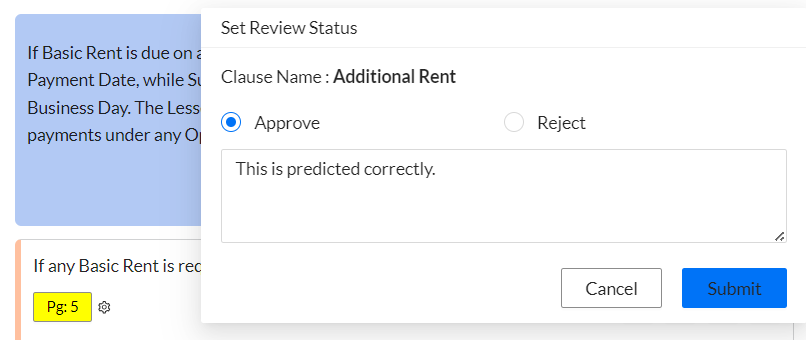
Click Submit to Complete the Review
After entering your comments, click Submit to finalize the review. The clause will be marked as reviewed, and the system will update accordingly, reflecting that the clause has been validated.

What’s Next?
After reviewing and submitting the clause, the AI will record your feedback and continue to improve its clause prediction abilities. This ensures that as you review more clauses, the system becomes more accurate in its future predictions. You can continue to review other clauses, track the progress of the document, and ensure all abstracted information is correct and ready for use in reports or further analysis.
Was this article helpful?
That’s Great!
Thank you for your feedback
Sorry! We couldn't be helpful
Thank you for your feedback
Feedback sent
We appreciate your effort and will try to fix the article